Local protection
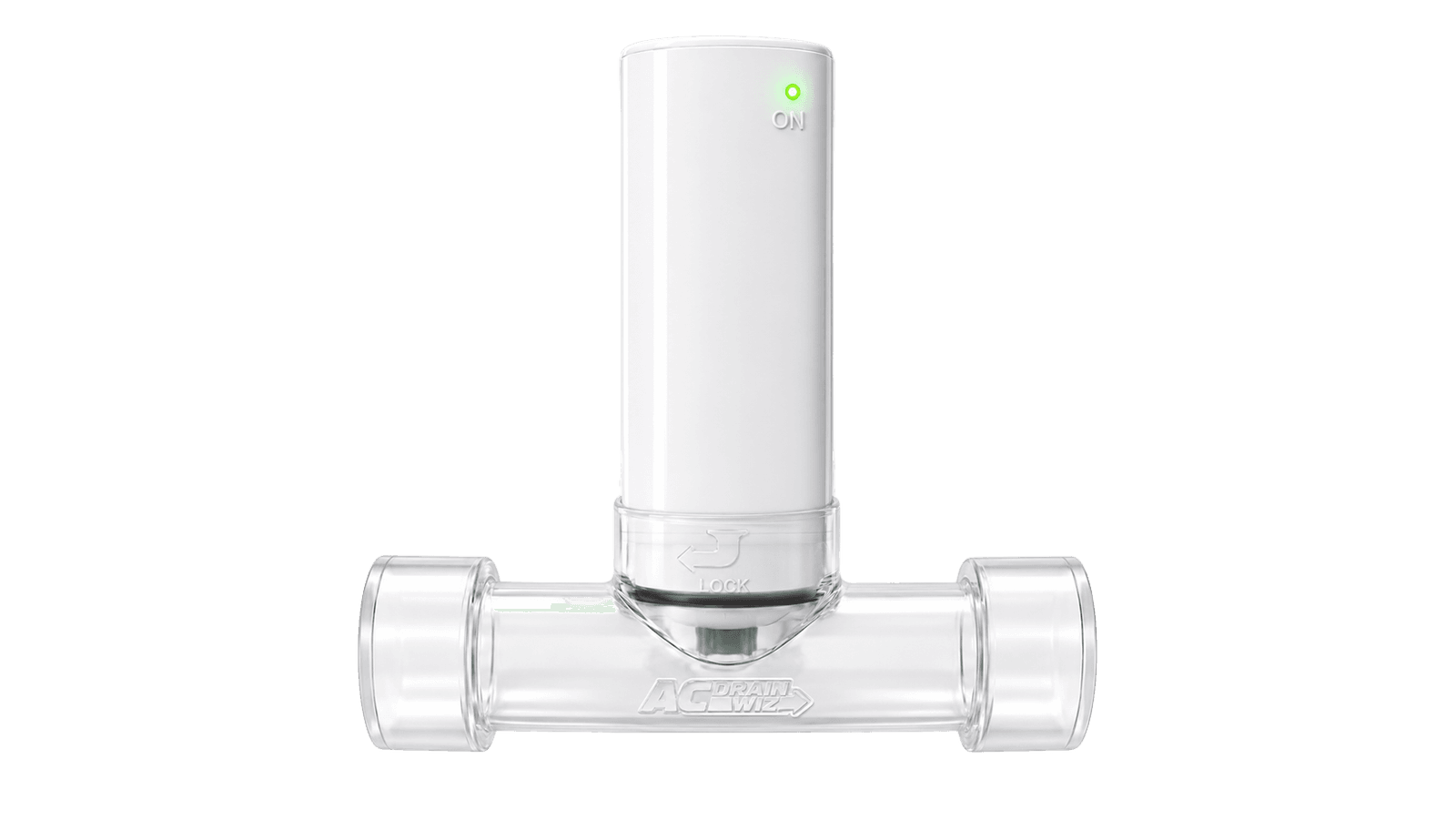
Sensor Switch
Reliable overflow shutoff, no Wi-Fi required.
- Shuts the AC off at 80% water level
- Status LED: green while monitoring, solid red at shutoff
- Capacitive sensing with no moving parts
- Runs on 24V from the air handler
AC Drain Wiz
Shuts the AC off before the pan overflows.
Standard and WiFi models · Professional installation

Water climbs, the light turns red and the AC stops before the pan can overflow. It stays red so you know why.
Both include the Transparent T-Manifold, so you don't need a Mini first.
Local protection
Reliable overflow shutoff, no Wi-Fi required.
Protection plus monitoring
Everything in the Standard model, plus:
WiFi Sensor Switch
Every WiFi Sensor reports to your company's monitoring dashboard, so you can plan the visit before the AC shuts off.
Water level, battery and last check-in for every sensor, organized by customer and address.
Up to three water-level alerts per sensor, plus AC-shutoff and low-battery alerts, by email, text or webhook.
No login needed. Up to 10 contacts per address can get email or text alerts.
Open a service call from an alert, set its priority, assign a technician and keep notes in one place.
Protection
At 80% water level, the Sensor shuts the AC off before the pan can overflow.
Reliability
Capacitive sensing means there's no float to stick or wear out, and it's fail-safe on power loss.
Install
A snap-to-lock bayonet on the included Transparent T-Manifold. No Mini needed.
WiFi model
Email and text alerts at water levels you set, so service happens before the AC goes down.
Code
Compliant with IMC 307.2.3 for condensate overflow protection.
| Specification | Sensor Switch | WiFi Sensor Switch |
|---|---|---|
| Dimensions | 2" × 3" × 1.5" | 2" × 3" × 1.5" |
| Power | 24V from air handler | 24V recommended; Li-ion backup (~2 years) or battery-only supported |
| Connectivity | None (local shutoff only) | Wi-Fi (2.4 GHz only) |
| Mounting | Snap-to-lock bayonet on the included T-Manifold | Snap-to-lock bayonet on the included T-Manifold |
| Typical install time | About 15 minutes | 15 to 20 minutes |
| Compliance | IMC 307.2.3 | IMC 307.2.3 |
Know where power ends and the control circuit begins before you land terminals. Keep a copy on the truck.
Download the full diagram (PDF)This wiring diagram is for a 24-volt AC control circuit.
4 wires exit the main housing toward the bottom of the sensor.
Power pair → Hot and Common on the 24V AC source.
Control pair → Safety Input and Safety Common.
Control (24V AC)
Connect the control pair to the AC unit safety circuit as shown.
Power (24V AC)
Connect the power pair to the 24V AC source as shown.
AC Unit Control Circuit
Condensate Overflow Safety Circuit
24-Volt AC Power Source
This wiring diagram is for a 24-volt AC control circuit.
4 wires exit the main housing toward the bottom of the sensor.
Control (24V AC)
Connect the control pair to the AC unit safety circuit as shown.
AC Unit Control Circuit
Condensate Overflow Safety Circuit
Power (24V AC)
Connect the power pair to the 24V AC source as shown.
24-Volt AC Power Source
Important safety instructions
1. Turn off power
Turn off power before installation.
2. Confirm all connections
Confirm all connections are tight, insulated and wired according to the diagram before powering the system.
Three steps, 15 to 20 minutes.
Snap the Sensor onto the bayonet port of the included Transparent T-Manifold.
Connect 24V from the air handler. The WiFi model can also run on its backup battery.
Touch-test the cap and the status LED turns solid red. WiFi model: pair it to Wi-Fi and assign it to a customer.
For contractors & businesses
Tell us about your business and which product you’re looking at. Our sales team will follow up with pricing within 24 hours.
Prefer to talk? Call 83-DRAINWIZ, (833) 724-6949